-1.png?height=120&name=Halo%20Illustrations%20(1)-1.png)
Get logged in, set-up your customisations and create your first log with this step-by-step user guide.
Getting Started
Teams and Users
Creating your First Log
- Create a New Log
- Adding Geofence Tags
- Add Documents to your Log
- Add Zones to your Log
- Assign Users and Teams to a Log
What's Next?
It's time to set up your Custom Forms!
Getting Started
Only Halo Admins have access to the HaloHub, can set up and customise the system, and can create new logs. To be given Halo Admin access and permissions, you need to be invited by the Halo Team via an email invitation link.
Logging in for the First Time
Navigating the Interface
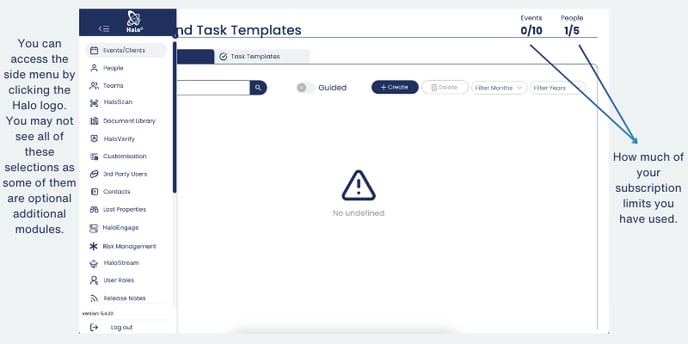
Once you’re in the Hub you’ll see a page labelled events and task templates, as well as a side menu. There are currently no events in this example.
Customising the Interface
You can customise the System interface to fit in better with your existing operations. You can do this by editing Key Labels, and adding custom logos to individual logs, which will then appear in the dashboard for that log (we'll run through this further down).
Teams and Users
Creating a New User
Only Halo Admins can add new users in the HaloHub. You can add single users at any time, either for daily operations or specific events. For first-time set-up, we offer an advanced onboarding session during which your Halo Partnership Manager can bulk-upload system users.
Creating a New Team
Teams can be used to communicate and share within specific groups or departments, across all logs. Build teams for specific events/logs, or crate your teams around your organisation's structure.
How to Reset a Users Password
Using the icons below, you can manage teams, view the event list, reset the password and check login details. To reset a password please see the scribe tutorial below:

Creating your First Log
Now you're logged in, it's time to set up your first log. This could be a single event log, a daily operations log, or a custom log that suits your unique operational needs. Not sure what we mean by Log? Check out our Halo Terminology Guide.
First, you will need to create the Log, then you can build it out with additional details including location parameters, associated documents, zones, teams and users. Follow the next 5 tutorials to fully set-up your first Log.
1) Creating your First Log
2) Adding Geofences To Your Log
3) Add Documents To Your Log
4) Add Zones to your Logs
5) Assign Users to your Log
What's Next?
Now that you've logged in, added some users and set up your first Log, it's time to build out your Log operations and functionality through our Custom Forms Builder.
Click here to jump to our next User Guide: Setting Up Custom Forms